
Boundary values
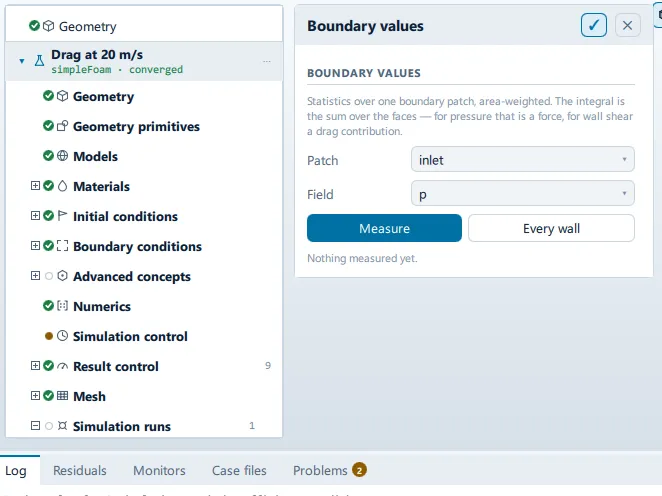
Where it is
Section titled “Where it is”Setup tree: Post-processing > Boundary values
Controls
Section titled “Controls”Boundary values
Section titled “Boundary values”- Control: choice (
ComboRow) - Shown when:
Results.ready && root.fieldsAreThisRun
A wall: the body itself.
- Control: choice (
ComboRow) - Shown when:
Results.ready && root.fieldsAreThisRun
Derived here, not written by the solver.
Measure
Section titled “Measure”- Control: action (
ToolButton2) - Enabled when:
root.pickedPatch !== "" && root.pickedField !== ""
Every wall
Section titled “Every wall”- Control: action (
ToolButton2) - Enabled when:
root.fieldsAreThisRun && Results.hasWalls && root.pickedField !== ""
Recompute
Section titled “Recompute”- Control: action (
ToolButton2) - Enabled when:
Results.ready && root.fieldsAreThisRun
Export as CSV
Section titled “Export as CSV”- Control: action (
ToolButton2)
Conditional and repeated groups
Section titled “Conditional and repeated groups”Per item in PostState.measurements
Section titled “Per item in PostState.measurements”repeated once for every entry in PostState.measurements
Remove
Section titled “Remove”- Control: action (
ToolButton2)
Lists this panel shows
Section titled “Lists this panel shows”Read straight from the data behind the panel, not from a hand-written list.
Boundary values
Section titled “Boundary values”From a fixed list in the application.
| l |
|---|
| Faces |
| Area |
| Minimum |
| Maximum |
| Area mean |
| Area integral |
| Flow rate |
| Time |
Problems reported against this step
Section titled “Problems reported against this step”The application reports no problems against this step.
… marks a value the application computes at run time, so the source carries no fixed text for it.