
Result control
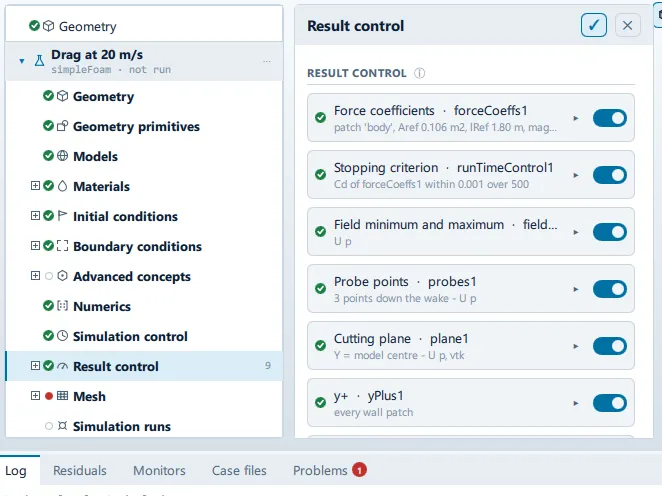
Where it is
Section titled “Where it is”Setup tree: Result control
Controls
Section titled “Controls”+ Force coefficients
Section titled “+ Force coefficients”- Control: action (
ToolButton2)
+ Forces and moments
Section titled “+ Forces and moments”- Control: action (
ToolButton2)
+ Probe points
Section titled “+ Probe points”- Control: action (
ToolButton2)
+ Cutting plane
Section titled “+ Cutting plane”- Control: action (
ToolButton2)
+ Patch data
Section titled “+ Patch data”- Control: action (
ToolButton2)
+ Volume data
Section titled “+ Volume data”- Control: action (
ToolButton2)
+ Field minimum and maximum
Section titled “+ Field minimum and maximum”- Control: action (
ToolButton2)
- Control: action (
ToolButton2)
+ Wall shear stress
Section titled “+ Wall shear stress”- Control: action (
ToolButton2)
+ Wall heat flux
Section titled “+ Wall heat flux”- Control: action (
ToolButton2)
+ Force distribution
Section titled “+ Force distribution”- Control: action (
ToolButton2)
+ Flow rate through a patch
Section titled “+ Flow rate through a patch”- Control: action (
ToolButton2)
+ Time averaging
Section titled “+ Time averaging”- Control: action (
ToolButton2)
+ Stopping criterion
Section titled “+ Stopping criterion”- Control: action (
ToolButton2)
+ Parcel cloud
Section titled “+ Parcel cloud”- Control: action (
ToolButton2)
+ Interface height
Section titled “+ Interface height”- Control: action (
ToolButton2)
+ Vortex cores (Q)
Section titled “+ Vortex cores (Q)”- Control: action (
ToolButton2)
+ Total-pressure loss
Section titled “+ Total-pressure loss”- Control: action (
ToolButton2)
+ Mixing index
Section titled “+ Mixing index”- Control: action (
ToolButton2)
+ Bed (mudline) height
Section titled “+ Bed (mudline) height”- Control: action (
ToolButton2)
+ Velocity distribution
Section titled “+ Velocity distribution”- Control: action (
ToolButton2)
+ Mean age of fluid
Section titled “+ Mean age of fluid”- Control: action (
ToolButton2)
+ Total pressure
Section titled “+ Total pressure”- Control: action (
ToolButton2)
+ Pressure coefficient
Section titled “+ Pressure coefficient”- Control: action (
ToolButton2)
+ Thermal comfort
Section titled “+ Thermal comfort”- Control: action (
ToolButton2)
+ Turbulence fields
Section titled “+ Turbulence fields”- Control: action (
ToolButton2)
+ Aeroacoustic sources
Section titled “+ Aeroacoustic sources”- Control: action (
ToolButton2)
Conditional and repeated groups
Section titled “Conditional and repeated groups”Per item in CaseState.resultControls
Section titled “Per item in CaseState.resultControls”repeated once for every entry in CaseState.resultControls
- Control: value (
ValueField) - Value modes: none (plain entry)
Names the directory under postProcessing/.
- Control: choice (
ComboRow) - Shown when:
["forceCoeffs", "forces", "patchData", "totalPressureLoss"] .indexOf(rcRow.model.kind) >= 0
Downstream patch
Section titled “Downstream patch”- Control: choice (
ComboRow) - Default: empty
- Shown when:
rcRow.model.kind === "totalPressureLoss"
References from the case
Section titled “References from the case”- Control: on/off (
ToggleRow) - Default:
true - Shown when:
rcRow.model.kind === "forceCoeffs"
Frontal area, model length and inlet speed as the geometry and the boundary conditions have them.
Reference area (m²)
Section titled “Reference area (m²)”- Control: value (
ValueField) - Default:
1 - Value modes: none (plain entry)
- Shown when:
rcRow.model.kind === "forceCoeffs" && !rcRow.model.refAuto
Reference length (m)
Section titled “Reference length (m)”- Control: value (
ValueField) - Default:
1 - Value modes: none (plain entry)
- Shown when:
rcRow.model.kind === "forceCoeffs" && !rcRow.model.refAuto
Reference speed (m/s)
Section titled “Reference speed (m/s)”- Control: value (
ValueField) - Default:
10 - Value modes: none (plain entry)
- Shown when:
rcRow.model.kind === "forceCoeffs" && !rcRow.model.refAuto
Moments about the model centre
Section titled “Moments about the model centre”- Control: on/off (
ToggleRow) - Default:
true - Shown when:
["forceCoeffs", "forces"].indexOf(rcRow.model.kind) >= 0
Off to give the centre of rotation directly.
Observer from the geometry
Section titled “Observer from the geometry”- Control: on/off (
ToggleRow) - Default:
true - Shown when:
rcRow.model.kind === "aeroacoustics"
Twenty body lengths above the centre, which is inside the compact-source assumption Curle is built on. Turn it off to listen somewhere else.
Observer X
Section titled “Observer X”- Control: value (
ValueField) - Unit: m
- Default:
0 - Writes:
functions/observerPositions - Value modes: none (plain entry)
- Shown when:
rcRow.model.kind === "aeroacoustics" && !rcRow.model.obsAuto && String(rcRow.model.obsPrimitive || "") === ""
Observer Y
Section titled “Observer Y”- Control: value (
ValueField) - Unit: m
- Default:
0 - Writes:
functions/observerPositions - Value modes: none (plain entry)
- Shown when:
rcRow.model.kind === "aeroacoustics" && !rcRow.model.obsAuto && String(rcRow.model.obsPrimitive || "") === ""
Observer Z
Section titled “Observer Z”- Control: value (
ValueField) - Unit: m
- Default:
0 - Writes:
functions/observerPositions - Value modes: none (plain entry)
- Shown when:
rcRow.model.kind === "aeroacoustics" && !rcRow.model.obsAuto && String(rcRow.model.obsPrimitive || "") === ""
Centre of rotation X
Section titled “Centre of rotation X”- Control: value (
ValueField) - Unit: m
- Default:
0 - Value modes: none (plain entry)
- Shown when:
["forceCoeffs", "forces"].indexOf(rcRow.model.kind) >= 0 && !rcRow.model.cofrAuto && String(rcRow.model.cofrPrimitive || "") === ""
Centre of rotation Y
Section titled “Centre of rotation Y”- Control: value (
ValueField) - Unit: m
- Default:
0 - Value modes: none (plain entry)
- Shown when:
["forceCoeffs", "forces"].indexOf(rcRow.model.kind) >= 0 && !rcRow.model.cofrAuto && String(rcRow.model.cofrPrimitive || "") === ""
Centre of rotation Z
Section titled “Centre of rotation Z”- Control: value (
ValueField) - Unit: m
- Default:
0 - Value modes: none (plain entry)
- Shown when:
["forceCoeffs", "forces"].indexOf(rcRow.model.kind) >= 0 && !rcRow.model.cofrAuto && String(rcRow.model.cofrPrimitive || "") === ""
Placement
Section titled “Placement”- Control: choice (
ComboRow) - Default:
Wake - Options:
Wake,Primitives,Custom - Shown when:
rcRow.model.kind === "probes"
Primitives probes at named Point primitives, so a probe moves when the point it names moves. Wake spaces them off the back of the model along the flow, in model lengths. Custom takes typed coordinates.
Points
Section titled “Points”- Control: value (
ValueField) - Default:
3 - Value modes: none (plain entry)
- Shown when:
rcRow.model.kind === "probes" && rcRow.model.probeMode === "Wake"
Locations
Section titled “Locations”- Control: value (
ValueField) - Default:
(0 0 0) - Value modes: none (plain entry)
- Shown when:
rcRow.model.kind === "probes" && rcRow.model.probeMode === "Custom"
Syntax: (0 0 0) (1 0 0)
Normal
Section titled “Normal”- Control: choice (
ComboRow) - Default:
Y - Options:
X,Y,Z - Shown when:
rcRow.model.kind === "cuttingPlane"
Through the model centre
Section titled “Through the model centre”- Control: on/off (
ToggleRow) - Default:
true - Shown when:
rcRow.model.kind === "cuttingPlane"
Offset (m)
Section titled “Offset (m)”- Control: value (
ValueField) - Default:
0 - Value modes: none (plain entry)
- Shown when:
rcRow.model.kind === "cuttingPlane" && !rcRow.model.planeOffsetAuto && !planeFrom.usesPrimitive
Format
Section titled “Format”- Control: choice (
ComboRow) - Default:
vtk - Options:
vtk,raw,ensight,foam - Shown when:
rcRow.model.kind === "cuttingPlane"
Operation
Section titled “Operation”- Control: choice (
ComboRow) - Options:
sum,areaAverage,areaIntegrate,min,max,areaNormalIntegrate - Shown when:
rcRow.model.kind === "patchData"
sum of phi over an inlet or outlet is its volumetric flow.
Operation
Section titled “Operation”- Control: choice (
ComboRow) - Options:
volAverage,volIntegrate,sum,min,max - Shown when:
rcRow.model.kind === "volumeData"
Start at
Section titled “Start at”- Control: value (
ValueField) - Default:
0 - Value modes: none (plain entry)
- Shown when:
rcRow.model.kind === "fieldAverage"
The in-app guidance depends on the case:
- Iteration to start averaging from.
- Time in seconds to start from.
Variance as well as mean
Section titled “Variance as well as mean”- Control: on/off (
ToggleRow) - Default:
true - Shown when:
rcRow.model.kind === "fieldAverage"
Watching
Section titled “Watching”- Control: value (
ValueField) - Default:
forceCoeffs1 - Value modes: none (plain entry)
- Shown when:
rcRow.model.kind === "runTimeControl"
The name of another item on this list - a force coefficient item, usually.
Quantity
Section titled “Quantity”- Control: value (
ValueField) - Default:
Cd - Value modes: none (plain entry)
- Shown when:
rcRow.model.kind === "runTimeControl"
Tolerance
Section titled “Tolerance”- Control: value (
ValueField) - Default:
0.001 - Value modes: none (plain entry)
- Shown when:
rcRow.model.kind === "runTimeControl"
Window
Section titled “Window”- Control: value (
ValueField) - Default:
500 - Value modes: none (plain entry)
- Shown when:
rcRow.model.kind === "runTimeControl"
Iterations the average is taken over.
Fields
Section titled “Fields”- Control: value (
ValueField) - Value modes: none (plain entry)
- Shown when:
["probes", "cuttingPlane", "patchData", "volumeData", "fieldMinMax", "fieldAverage"] .indexOf(rcRow.model.kind) >= 0
Space separated, as the solver names them: U p k omega.
Only when the solver writes
Section titled “Only when the solver writes”- Control: on/off (
ToggleRow) - Shown when:
["yPlus", "wallShearStress", "fieldAverage", "runTimeControl"].indexOf(rcRow.model.kind) < 0
A sampled plane written at every time step is thousands of files and a run that spends its time on IO.
Write every
Section titled “Write every”- Control: value (
ValueField) - Default:
1 - Value modes: none (plain entry)
- Shown when:
["yPlus", "wallShearStress", "fieldAverage", "runTimeControl"].indexOf(rcRow.model.kind) < 0 && !rcRow.model.atWriteTime
Time steps between writes.
Remove
Section titled “Remove”- Control: action (
ToolButton2)
Problems reported against this step
Section titled “Problems reported against this step”The application checks these before a run and reports them in the Problems tab against this step.
| Severity | Message |
|---|---|
| error | Force coefficients are scaled by … m/s but the inlet is … m/s. Every coefficient would be out by a factor of …. |
| warn | … measures the patch “…”, which this case does not have - most likely it was set up before the geometry was imported. It will not be written; pick one of: …. |
| error | Mean age of fluid needs an inlet to measure age from. This case has none, so the field would be uniform rather than wrong in a way you could see. |
| error | Thermal comfort is assessed from the air temperature, and this case does not solve for one. Turn the energy equation on, or take the control off. |
| error | Turbulence fields has nothing to write on a laminar case: there is no model to ask for k, epsilon or the Reynolds stress. |
… marks a value the application computes at run time, so the source carries no fixed text for it.