
Post-processing
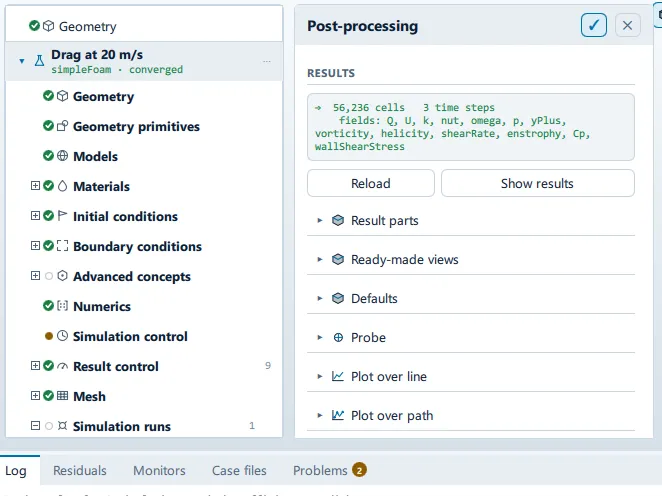
Where it is
Section titled “Where it is”Setup tree: Post-processing
Controls
Section titled “Controls”Results
Section titled “Results”Reload
Section titled “Reload”- Control: action (
ToolButton2)
Viewing results
Section titled “Viewing results”Label changes with the case; the source gives these forms: Viewing results, Show results.
- Control: action (
ToolButton2) - Enabled when:
Results.ready
Streamline seeds
Section titled “Streamline seeds”- Control: value (
ValueField) - Bound to:
PostState.defaultSeedCount - Value modes: none (plain entry)
Enough to read the flow, few enough to see the model through them. A few hundred over a seed plane covers the model in a solid curtain; a hundred or so reads as a flow.
Export probe as CSV
Section titled “Export probe as CSV”- Control: action (
ToolButton2) - Shown when:
PostState.probeHasPoint
Hide the line plot
Section titled “Hide the line plot”Label changes with the case; the source gives these forms: Hide the line plot, Sample along a line.
- Control: action (
ToolButton2) - Shown when:
Results.ready
- Control: choice (
ComboRow) - Default: empty
- Bound to:
PostState.lineField - Shown when:
PostState.lineActive
Component
Section titled “Component”- Control: choice (
ComboRow) - Bound to:
PostState.componentOptions - Shown when:
PostState.lineActive && Results.componentCount(PostState.lineField) > 1
From X
Section titled “From X”- Control: value (
ValueField) - Unit: m
- Value modes: none (plain entry)
- Shown when:
PostState.lineActive
From Y
Section titled “From Y”- Control: value (
ValueField) - Unit: m
- Value modes: none (plain entry)
- Shown when:
PostState.lineActive
From Z
Section titled “From Z”- Control: value (
ValueField) - Unit: m
- Value modes: none (plain entry)
- Shown when:
PostState.lineActive
- Control: value (
ValueField) - Unit: m
- Value modes: none (plain entry)
- Shown when:
PostState.lineActive
- Control: value (
ValueField) - Unit: m
- Value modes: none (plain entry)
- Shown when:
PostState.lineActive
- Control: value (
ValueField) - Unit: m
- Value modes: none (plain entry)
- Shown when:
PostState.lineActive
Samples
Section titled “Samples”- Control: value (
ValueField) - Default:
200 - Bound to:
PostState.lineCount - Value modes: none (plain entry)
- Shown when:
PostState.lineActive
Aim at the model
Section titled “Aim at the model”- Control: action (
ToolButton2) - Enabled when:
Results.ready
Export CSV
Section titled “Export CSV”- Control: action (
ToolButton2) - Enabled when:
PostState.lineSamples.length > 0
Hide the path plot
Section titled “Hide the path plot”Label changes with the case; the source gives these forms: Hide the path plot, Sample along a path.
- Control: action (
ToolButton2) - Shown when:
Results.ready
Click points on the model… (…)
Section titled “Click points on the model… (…)”Label changes with the case; the source gives these forms: Click points on the model… (…), Pick points.
- Control: action (
ToolButton2) - Shown when:
PostState.pathActive
- Control: choice (
ComboRow) - Default: empty
- Bound to:
PostState.pathField - Shown when:
PostState.pathActive
Component
Section titled “Component”- Control: choice (
ComboRow) - Bound to:
PostState.componentOptions - Shown when:
PostState.pathActive && Results.componentCount(PostState.pathField) > 1
Subdivisions
Section titled “Subdivisions”- Control: value (
ValueField) - Default:
20 - Bound to:
PostState.pathSubdivisions - Value modes: none (plain entry)
- Shown when:
PostState.pathActive
Sample points along each leg of the path, not along the whole of it — so adding a point does not thin out the ones already there.
Generate plot
Section titled “Generate plot”- Control: action (
ToolButton2) - Enabled when:
PostState.pathPoints.length >= 2 && PostState.pathField !== ""
Clear points
Section titled “Clear points”- Control: action (
ToolButton2) - Enabled when:
PostState.pathPoints.length > 0
Export CSV
Section titled “Export CSV”- Control: action (
ToolButton2) - Shown when:
PostState.pathActive && PostState.pathSamples.length > 0
New field
Section titled “New field”- Control: value (
ValueField) - Value modes: none (plain entry)
- Shown when:
Results.ready
Compute
Section titled “Compute”- Control: action (
ToolButton2) - Shown when:
Results.ready - Enabled when:
root.calcName !== "" && root.calcFormula !== "" && root.calcCheck.ok === true
+ Add direction
Section titled “+ Add direction”- Control: action (
ToolButton2)
Reset to 8 compass points
Section titled “Reset to 8 compass points”- Control: action (
ToolButton2)
Sweeping (… / …)…
Section titled “Sweeping (… / …)…”Label changes with the case; the source gives these forms: Sweeping (… / …)…, Run wind-rose sweep.
- Control: action (
ToolButton2) - Shown when:
CaseState.pwcCase - Enabled when:
CaseState.meshExists && !CaseState.windRoseSweepRunning && JobExecutor.available
Lists this panel shows
Section titled “Lists this panel shows”Read straight from the data behind the panel, not from a hand-written list.
Results
Section titled “Results”From a fixed list in the application.
- A
- B
- C
- D
- E
Results
Section titled “Results”From a fixed list in the application.
- A
- B
- C
- D
- E
Problems reported against this step
Section titled “Problems reported against this step”The application reports no problems against this step.
… marks a value the application computes at run time, so the source carries no fixed text for it.