
Refinements
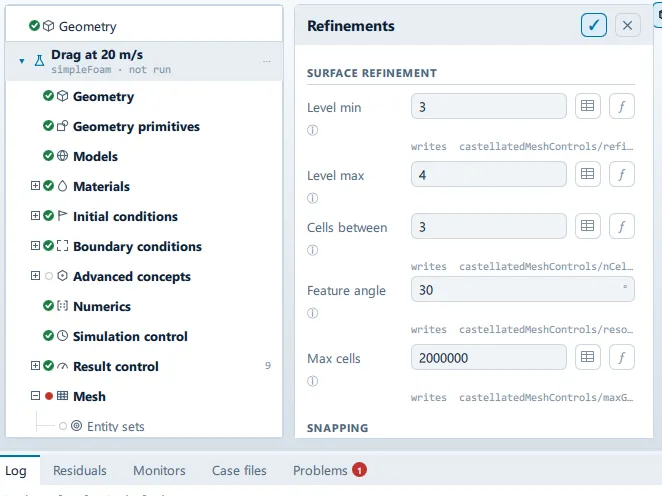
Where it is
Section titled “Where it is”Setup tree: Mesh > Refinements
Controls
Section titled “Controls”Surface refinement
Section titled “Surface refinement”Level min
Section titled “Level min”- Control: value (
ValueField) - Default:
3 - Bound to:
CaseState.surfaceLevelMin - Writes:
castellatedMeshControls/refinementSurfaces/body/level
Every cell touching the surface reaches this level.
Level max
Section titled “Level max”- Control: value (
ValueField) - Default:
4 - Bound to:
CaseState.surfaceLevelMax
Reached where the surface curves more sharply than the feature angle.
Cells between
Section titled “Cells between”- Control: value (
ValueField) - Default:
3 - Bound to:
CaseState.nCellsBetweenLevels - Writes:
castellatedMeshControls/nCellsBetweenLevels
Buffer cells between refinement levels. Higher is smoother and produces better quality, at more cells.
Feature angle
Section titled “Feature angle”- Control: value (
ValueField) - Unit: °
- Default:
30 - Bound to:
CaseState.resolveFeatureAngle - Writes:
castellatedMeshControls/resolveFeatureAngle - Value modes: none (plain entry)
Which edges get chased down to the surface level. Lower it towards 20 for a body with shallow curvature that is being missed; raise it towards 60 when feature refinement is running the cell count away. The one member of this block that was not reachable.
Max cells
Section titled “Max cells”- Control: value (
ValueField) - Default:
2000000 - Bound to:
CaseState.maxGlobalCells - Writes:
castellatedMeshControls/maxGlobalCells
Hard budget. Refinement stops when it is reached, so the mesh may not achieve the levels above.
Free surface
Section titled “Free surface”Refine the free surface
Section titled “Refine the free surface”- Control: on/off (
ToggleRow) - Default:
true - Bound to:
CaseState.waveSurfaceRefine - Writes:
castellatedMeshControls/refinementRegions/waveSurface - Shown when:
CaseState.isWaveCase
Halves the cell through a band at the still-water level until the wave height has about eight cells across it, up to three levels. Without it a tank sized from the wavelength meshes the surface on the same cell as the far end of the tank, and the crest flattens within a wavelength.
Snapping
Section titled “Snapping”Snap iterations
Section titled “Snap iterations”- Control: value (
ValueField) - Default:
30 - Bound to:
CaseState.nSolveIter - Writes:
snappyHexMeshDict/… - Value modes: none (plain entry)
Snap relax passes
Section titled “Snap relax passes”- Control: value (
ValueField) - Default:
5 - Bound to:
CaseState.nSnapRelaxIter - Writes:
snappyHexMeshDict/… - Value modes: none (plain entry)
Feature snap iterations
Section titled “Feature snap iterations”- Control: value (
ValueField) - Default:
10 - Bound to:
CaseState.nFeatureSnapIter - Writes:
snappyHexMeshDict/… - Value modes: none (plain entry)
Patch smoothing passes
Section titled “Patch smoothing passes”- Control: value (
ValueField) - Default:
3 - Bound to:
CaseState.nSmoothPatch - Writes:
snappyHexMeshDict/… - Value modes: none (plain entry)
Snap tolerance
Section titled “Snap tolerance”- Control: value (
ValueField) - Default:
2.0 - Bound to:
CaseState.snapTolerance - Writes:
snappyHexMeshDict/… - Value modes: none (plain entry)
Max cells per rank
Section titled “Max cells per rank”- Control: value (
ValueField) - Default:
1000000 - Bound to:
CaseState.maxLocalCells - Writes:
snappyHexMeshDict/… - Value modes: none (plain entry)
Min cells to refine
Section titled “Min cells to refine”- Control: value (
ValueField) - Default:
10 - Bound to:
CaseState.minRefinementCells - Writes:
snappyHexMeshDict/… - Value modes: none (plain entry)
Max load unbalance
Section titled “Max load unbalance”- Control: value (
ValueField) - Default:
0.10 - Bound to:
CaseState.maxLoadUnbalance - Writes:
snappyHexMeshDict/… - Value modes: none (plain entry)
Refinement regions
Section titled “Refinement regions”+ Add refinement region
Section titled “+ Add refinement region”- Control: action (
ToolButton2)
Conditional and repeated groups
Section titled “Conditional and repeated groups”Per item in CaseState.refinementRegions
Section titled “Per item in CaseState.refinementRegions”repeated once for every entry in CaseState.refinementRegions
- Control: choice (
ComboRow) - Default:
box - Options:
box,sphere - Shown when:
!regionCard.usesPrimitive
- Control: choice (
ComboRow) - Default:
inside - Options:
inside,outside,distance - Writes:
refinementRegions/…/mode
- Control: value (
ValueField) - Default:
2
Distance
Section titled “Distance”- Control: value (
ValueField) - Unit: L
- Default:
1.0 - Shown when:
regionCard.region.mode === "distance"
Placement
Section titled “Placement”- Control: choice (
ComboRow) - Options:
relative,absolute - Shown when:
!regionCard.usesPrimitive
The in-app guidance depends on the case:
- Metres in the case’s axes.
- Body lengths off the geometry box, so it follows the model.
- Control: value (
ValueField) - Unit: L
- Default:
1.0 - Shown when:
regionCard.regionShape === "box" && !regionCard.absolute
- Control: value (
ValueField) - Unit: L
- Default:
2.0 - Shown when:
regionCard.regionShape === "box" && !regionCard.absolute
- Control: value (
ValueField) - Unit: L
- Default:
1.0 - Shown when:
regionCard.regionShape === "box" && !regionCard.absolute
- Control: value (
ValueField) - Unit: L
- Default:
1.0 - Shown when:
regionCard.regionShape === "box" && !regionCard.absolute
- Control: value (
ValueField) - Unit: L
- Default:
1.0 - Shown when:
regionCard.regionShape === "box" && !regionCard.absolute
Problems reported against this step
Section titled “Problems reported against this step”The application reports no problems against this step.
… marks a value the application computes at run time, so the source carries no fixed text for it.