
Operations
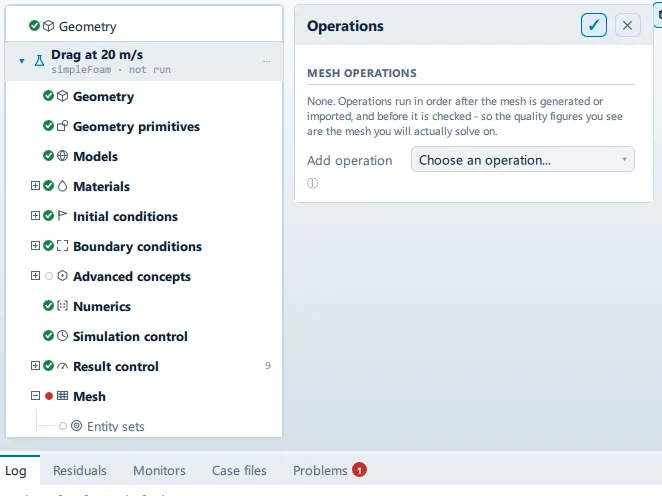
Where it is
Section titled “Where it is”Setup tree: Mesh > Operations
Controls
Section titled “Controls”Mesh operations
Section titled “Mesh operations”Add operation
Section titled “Add operation”- Control: choice (
ComboRow) - Default:
Choose an operation... - Options:
Choose an operation...,Renumber for bandwidth,Scale, move or rotate,Mirror about a plane,Refine cells,Extrude a patch,Rename or merge patches,Keep only part of the mesh,Merge in another mesh,Stitch two patches together,Convert to polyhedra,Collapse short edges,Combine coplanar faces,Rotate onto an axis,Zip up open cells,Split the boundary by angle(fromCaseState.meshOperationKinds)
Added at the end of the pipeline. Reorder with the arrows.
Conditional and repeated groups
Section titled “Conditional and repeated groups”Per item in CaseState.meshOperations
Section titled “Per item in CaseState.meshOperations”repeated once for every entry in CaseState.meshOperations
↑
- Control: action (
ToolButton2) - Enabled when:
opRow.index > 0
- Control: action (
ToolButton2) - Enabled when:
opRow.index < CaseState.meshOperations.count - 1
Label changes with the case; the source gives these forms: On, Off.
- Control: action (
ToolButton2)
- Control: action (
ToolButton2)
transformPoints
Section titled “transformPoints”selected for: transformPoints
- Control: value (
ValueField) - Default:
1.0 - Value modes: none (plain entry)
A factor applied to every coordinate. Leave at 1 to move instead of scale - the two are separate invocations, because doing both at once applies them in an order nobody expects.
Move X
Section titled “Move X”- Control: value (
ValueField) - Unit: m
- Default:
0.0 - Value modes: none (plain entry)
Move Y
Section titled “Move Y”- Control: value (
ValueField) - Unit: m
- Default:
0.0 - Value modes: none (plain entry)
Move Z
Section titled “Move Z”- Control: value (
ValueField) - Unit: m
- Default:
0.0 - Value modes: none (plain entry)
rotateMesh
Section titled “rotateMesh”selected for: rotateMesh
From axis
Section titled “From axis”- Control: choice (
ComboRow) - Default:
z - Options:
x,-x,y,-y,z,-z(from ``parent.axesin this panel)
To axis
Section titled “To axis”- Control: choice (
ComboRow) - Default:
x - Options:
x,-x,y,-y,z,-z(from ``parent.axesin this panel)
Rotates the mesh so the first direction ends up pointing along the second.
mirrorMesh
Section titled “mirrorMesh”selected for: mirrorMesh
Normal X
Section titled “Normal X”- Control: value (
ValueField) - Default:
0.0 - Value modes: none (plain entry)
- Shown when:
planeFrom.usesPrimitive
Normal Y
Section titled “Normal Y”- Control: value (
ValueField) - Default:
1.0 - Value modes: none (plain entry)
- Shown when:
planeFrom.usesPrimitive
Normal Z
Section titled “Normal Z”- Control: value (
ValueField) - Default:
0.0 - Value modes: none (plain entry)
- Shown when:
planeFrom.usesPrimitive
Point X
Section titled “Point X”- Control: value (
ValueField) - Default:
0.0 - Value modes: none (plain entry)
- Shown when:
planeFrom.usesPrimitive
Point Y
Section titled “Point Y”- Control: value (
ValueField) - Default:
0.0 - Value modes: none (plain entry)
- Shown when:
planeFrom.usesPrimitive
Point Z
Section titled “Point Z”- Control: value (
ValueField) - Default:
0.0 - Value modes: none (plain entry)
- Shown when:
planeFrom.usesPrimitive
refineMesh
Section titled “refineMesh”selected for: refineMesh
Cell set
Section titled “Cell set”- Control: value (
ValueField) - Default: empty
- Value modes: none (plain entry)
Leave empty to refine every cell, which multiplies the cell count by eight. Name a cellSet to refine only that.
Directions
Section titled “Directions”- Control: choice (
ComboRow) - Default:
xyz - Options:
xyz,xy,xz,yz,x,y,z
Which directions get cut. All three multiplies the cell count by eight; one direction doubles it, which is what a wake or a boundary layer usually wants.
extrudeMesh
Section titled “extrudeMesh”selected for: extrudeMesh
- Control: choice (
ComboRow) - Default:
Linear, along the patch normal - Options:
Linear, along the patch normal,Wedge (axisymmetric),Rotate about an axis
Linear one cell thick is a 2D case. Wedge is how axisymmetry is done - there is no 2D solver, so a wedge of a few degrees with wedge patches stands in for one.
Source patch
Section titled “Source patch”- Control: choice (
ComboRow) - Default: empty
The surface that gets swept into a volume.
Thickness
Section titled “Thickness”- Control: value (
ValueField) - Unit: m
- Default:
0.01 - Value modes: none (plain entry)
- Shown when:
op && String(op.extrudeMode).indexOf("Linear") === 0
- Control: value (
ValueField) - Unit: deg
- Default:
5.0 - Value modes: none (plain entry)
- Shown when:
op && String(op.extrudeMode).indexOf("Linear") !== 0
Five degrees is the usual wedge. It has to be small enough that one cell across the wedge is a reasonable model.
Layers
Section titled “Layers”- Control: value (
ValueField) - Default:
1 - Value modes: none (plain entry)
- Shown when:
op && String(op.extrudeMode).indexOf("Wedge") !== 0
One layer is a 2D case. More makes it genuinely three dimensional.
Axis X
Section titled “Axis X”- Control: value (
ValueField) - Default:
0.0 - Value modes: none (plain entry)
- Shown when:
op && String(op.extrudeMode).indexOf("Linear") !== 0 && !extrudeAxisFrom.usesPrimitive
Axis Y
Section titled “Axis Y”- Control: value (
ValueField) - Default:
0.0 - Value modes: none (plain entry)
- Shown when:
op && String(op.extrudeMode).indexOf("Linear") !== 0 && !extrudeAxisFrom.usesPrimitive
Axis Z
Section titled “Axis Z”- Control: value (
ValueField) - Default:
1.0 - Value modes: none (plain entry)
- Shown when:
op && String(op.extrudeMode).indexOf("Linear") !== 0 && !extrudeAxisFrom.usesPrimitive
createPatch
Section titled “createPatch”selected for: createPatch
New patch
Section titled “New patch”- Control: value (
ValueField) - Default: empty
- Value modes: none (plain entry)
- Control: choice (
ComboRow) - Default:
wall - Options:
wall,patch,symmetry,empty,wedge,cyclic
wall is what makes wall functions available; empty is what makes a mesh two dimensional.
subsetMesh
Section titled “subsetMesh”selected for: subsetMesh
Cell set
Section titled “Cell set”- Control: value (
ValueField) - Default: empty
- Value modes: none (plain entry)
The set to keep. Everything outside it is discarded, so this is not reversible within the run.
mergeMeshes
Section titled “mergeMeshes”selected for: mergeMeshes
Other case
Section titled “Other case”- Control: value (
ValueField) - Default: empty
- Value modes: none (plain entry)
Path to a case directory holding the mesh to add. The two are placed side by side, not connected - add a Stitch afterwards to join them.
stitchMesh
Section titled “stitchMesh”selected for: stitchMesh
Master patch
Section titled “Master patch”- Control: choice (
ComboRow) - Default: empty
Slave patch
Section titled “Slave patch”- Control: choice (
ComboRow) - Default: empty
The two become an internal boundary, which is what turns two merged meshes into one connected domain.
polyDualMesh / autoPatch / combinePatchFaces
Section titled “polyDualMesh / autoPatch / combinePatchFaces”selected for: polyDualMesh, autoPatch, combinePatchFaces
Feature angle
Section titled “Feature angle”- Control: value (
ValueField) - Unit: deg
- Default:
45.0 - Value modes: none (plain entry)
Surfaces that turn by more than this are treated as separate features.
collapseEdges
Section titled “collapseEdges”selected for: collapseEdges
Minimum edge
Section titled “Minimum edge”- Control: value (
ValueField) - Unit: m
- Default:
1e-5 - Value modes: none (plain entry)
Edges shorter than this are collapsed. Set it well below the base cell size or the mesh loses real features.
Problems reported against this step
Section titled “Problems reported against this step”The application reports no problems against this step.
… marks a value the application computes at run time, so the source carries no fixed text for it.