
Initial conditions
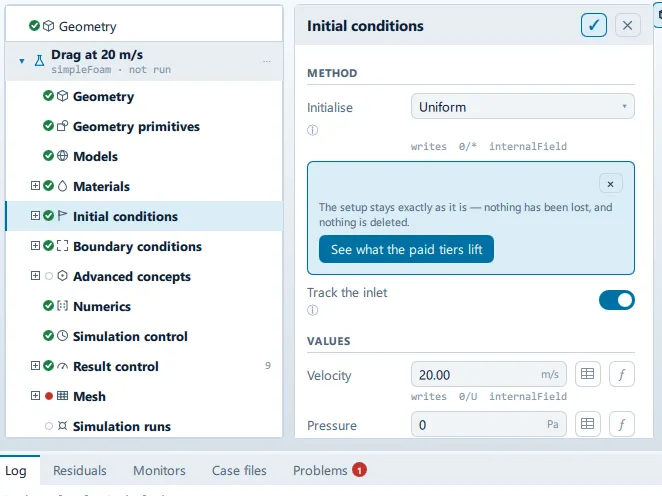
Where it is
Section titled “Where it is”Setup tree: Initial conditions
Controls
Section titled “Controls”Method
Section titled “Method”Initialise
Section titled “Initialise”- Control: choice (
ComboRow) - Default:
Uniform - Bound to:
CaseState.initMethod - Options:
Uniform,Potential flow,From an existing run - Writes:
potentialFoam (U only),potentialFoam -writephi,0/* internalField - Shown when:
root.wholePage
Source case
Section titled “Source case”- Control: value (
ValueField) - Default: empty
- Bound to:
CaseState.initMapSource - Value modes: none (plain entry)
- Shown when:
root.wholePage && CaseState.initMethod === "From an existing run"
The case directory to map from. Its latest time is used.
Use this case’s own run
Section titled “Use this case’s own run”- Control: action (
ToolButton2) - Enabled when:
CaseState.runDirectory !== ""
Track the inlet
Section titled “Track the inlet”- Control: on/off (
ToggleRow) - Default:
true - Bound to:
CaseState.initFromInlet - Shown when:
root.wholePage
Seed the domain with the inlet’s velocity and turbulence, so changing the inlet keeps the initial field consistent.
Values
Section titled “Values”Velocity
Section titled “Velocity”- Control: value (
ValueField) - Unit: m/s
- Bound to:
CaseState.effectiveInitVelocity - Writes:
0/U internalField - Shown when:
root.showsField("U")
Pressure
Section titled “Pressure”- Control: value (
ValueField) - Unit: Pa
- Default:
0 - Bound to:
CaseState.initPressure - Writes:
0/p … m²/s² (kinematic) - Shown when:
root.wholePage || root.fieldFilter === "p" || root.fieldFilter === "p_rgh"
Temperature
Section titled “Temperature”- Control: value (
ValueField) - Unit: K
- Default:
293.15 - Bound to:
CaseState.initTemperature - Writes:
0/T internalField - Shown when:
CaseState.energyEnabled && root.showsField("T")
Turbulence
Section titled “Turbulence”Intensity
Section titled “Intensity”- Control: value (
ValueField) - Unit: %
- Bound to:
CaseState.effectiveInitIntensity - Shown when:
CaseState.turbulenceFields.length > 1 && root.turbulencePage
Length scale
Section titled “Length scale”- Control: value (
ValueField) - Unit: m
- Bound to:
CaseState.effectiveInitLengthScale - Shown when:
CaseState.turbulenceFields.length > 1 && root.turbulencePage
Written to 0/
Section titled “Written to 0/”+ Add subdomain
Section titled “+ Add subdomain”Label changes with the case; the source gives these forms: + Add subdomain, + Add subdomain of ….
- Control: action (
ToolButton2)
Conditional and repeated groups
Section titled “Conditional and repeated groups”Per item in CaseState.initRegions
Section titled “Per item in CaseState.initRegions”repeated once for every entry in CaseState.initRegions
- Control: choice (
ComboRow) - Default:
box - Options:
box,sphere - Writes:
setFieldsDict/regions - Shown when:
!regionCard.usesPrimitive
- Control: choice (
ComboRow)
Which field setFields writes here. Changing it moves this subdomain under that field in the tree.
- Control: value (
ValueField) - Default:
1 - Value modes: none (plain entry)
A bare number for a scalar, or (x y z) for a vector — which keyword setFields needs depends on it.
- Control: value (
ValueField) - Unit: m
- Value modes: none (plain entry)
- Shown when:
regionCard.usesPrimitive
- Control: value (
ValueField) - Unit: m
- Value modes: none (plain entry)
- Shown when:
regionCard.usesPrimitive
- Control: value (
ValueField) - Unit: m
- Value modes: none (plain entry)
- Shown when:
regionCard.usesPrimitive
- Control: value (
ValueField) - Unit: m
- Value modes: none (plain entry)
- Shown when:
regionCard.usesPrimitive
- Control: value (
ValueField) - Unit: m
- Value modes: none (plain entry)
- Shown when:
regionCard.usesPrimitive
- Control: value (
ValueField) - Unit: m
- Value modes: none (plain entry)
- Shown when:
regionCard.usesPrimitive
Centre X
Section titled “Centre X”- Control: value (
ValueField) - Unit: m
- Value modes: none (plain entry)
- Shown when:
regionCard.usesPrimitive
Centre Y
Section titled “Centre Y”- Control: value (
ValueField) - Unit: m
- Value modes: none (plain entry)
- Shown when:
regionCard.usesPrimitive
Centre Z
Section titled “Centre Z”- Control: value (
ValueField) - Unit: m
- Value modes: none (plain entry)
- Shown when:
regionCard.usesPrimitive
Radius
Section titled “Radius”- Control: value (
ValueField) - Unit: m
- Value modes: none (plain entry)
- Shown when:
regionCard.usesPrimitive
Problems reported against this step
Section titled “Problems reported against this step”The application reports no problems against this step.
… marks a value the application computes at run time, so the source carries no fixed text for it.