
Study
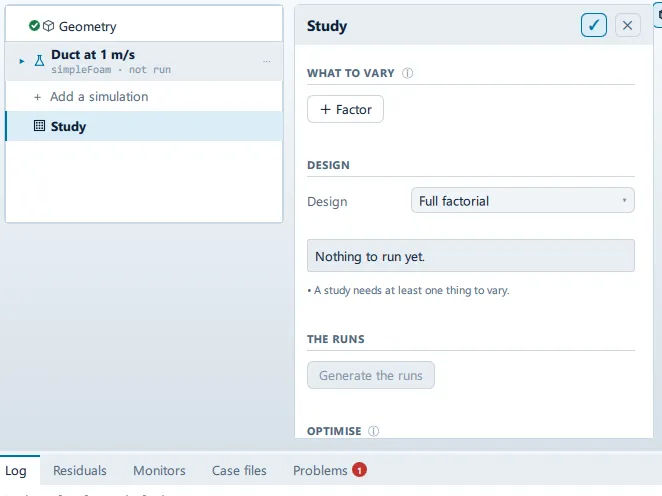
Where it is
Section titled “Where it is”Setup tree: Study
Controls
Section titled “Controls”WHAT TO VARY
Section titled “WHAT TO VARY”+ Factor
Section titled “+ Factor”- Control: action (
ToolButton2)
DESIGN
Section titled “DESIGN”Design
Section titled “Design”- Control: choice (
ComboRow)
Samples
Section titled “Samples”- Control: value (
ValueField) - Value modes: none (plain entry)
- Shown when:
root.lhs
The in-app guidance depends on the case:
- The size of each base sample, NOT the number of runs — a Sobol design asks for this many times the number of factors plus two. The indices are differences of means, so below a few hundred they carry real noise.
- How many runs. A Latin hypercube covers the space in whatever number you choose, which is why it does not explode.
- Control: value (
ValueField) - Value modes: none (plain entry)
- Shown when:
root.lhs
Saved with the case. The same seed gives the same points on any machine — without that a study’s results cannot be checked.
THE RUNS
Section titled “THE RUNS”Generate the runs
Section titled “Generate the runs”- Control: action (
ToolButton2) - Enabled when:
StudyState.solvable && StudyState.pointCount > 0 && root.allFactorsResolve && root.studyPointBlocker === ""
OPTIMISE
Section titled “OPTIMISE”- Control: choice (
ComboRow) - Options:
Minimise the result,Maximise the result
Budget
Section titled “Budget”- Control: value (
ValueField) - Value modes: none (plain entry)
The most runs the search may spend. Each one is a mesh and a solve, so this is a cost ceiling, not a quality knob.
Searching…
Section titled “Searching…”Label changes with the case; the source gives these forms: Searching…, Start the search.
- Control: action (
ToolButton2) - Enabled when:
!CaseState.optimisationRunning && root.allFactorsResolve && StudyState.factors.length > 0
- Control: action (
ToolButton2) - Shown when:
CaseState.optimisationRunning
THE SPREAD
Section titled “THE SPREAD”Judge against a limit
Section titled “Judge against a limit”- Control: on/off (
ToggleRow) - Shown when:
root.spreadResult !== null
The reliability question: what fraction of the plausible inputs put the answer past a threshold - a yield stress, a temperature rating, a drag target.
- Control: value (
ValueField) - Value modes: none (plain entry)
Beyond is
Section titled “Beyond is”- Control: choice (
ComboRow) - Options:
Above it,Below it
Conditional and repeated groups
Section titled “Conditional and repeated groups”Per item in root.factorList
Section titled “Per item in root.factorList”repeated once for every entry in root.factorList
Property
Section titled “Property”- Control: value (
ValueField) - Value modes: none (plain entry)
Nothing in the open study is called this. Dotted for nested values, e.g. structural.material.youngsModulus
✕
- Control: action (
ToolButton2)
Called
Section titled “Called”- Control: value (
ValueField) - Value modes: none (plain entry)
- Control: value (
ValueField) - Value modes: none (plain entry)
Values
Section titled “Values”- Control: value (
ValueField) - Value modes: none (plain entry)
A list — commas or spaces. Or leave it empty and give a range below.
- Control: value (
ValueField) - Value modes: none (plain entry)
A count of values, both ends included: 5 from 0 to 100 gives 0, 25, 50, 75, 100.
- Control: value (
ValueField) - Value modes: none (plain entry)
- Control: value (
ValueField) - Value modes: none (plain entry)
Sampled as
Section titled “Sampled as”- Control: choice (
ComboRow) - Options:
Uniform,Normal - Shown when:
root.lhs
- Control: value (
ValueField) - Value modes: none (plain entry)
Std dev
Section titled “Std dev”- Control: value (
ValueField) - Value modes: none (plain entry)
The give-or-take. A normal factor is sampled by its own tails, so the bounds above are not used for it.
Problems reported against this step
Section titled “Problems reported against this step”The application reports no problems against this step.
… marks a value the application computes at run time, so the source carries no fixed text for it.